Documentation Index
Fetch the complete documentation index at: https://laminar.sh/docs/llms.txt
Use this file to discover all available pages before exploring further.
This guide is an end-to-end setup for running a browser-use agent with the Laminar Debugger so you can rerun from checkpoints.
1) Install prerequisites
Install uv if you do not already have it:
Create a virtual environment and install dependencies:
uv venv --python 3.11
source .venv/bin/activate
uv pip install lmnr browser-use python-dotenv
2) Set environment variables
Create a .env file in your project root:
LMNR_PROJECT_API_KEY=your_laminar_project_api_key
BROWSER_USE_API_KEY=your_browser_use_api_key
ANTHROPIC_API_KEY=your_anthropic_api_key
CLAUDE_MODEL=your_claude_model_name
3) Create the entrypoint
import os
import asyncio
from dotenv import load_dotenv
from browser_use import Agent, ChatBrowserUse, ChatAnthropic
from lmnr import observe, Laminar

load_dotenv()
Laminar.initialize(project_api_key=os.getenv("LMNR_PROJECT_API_KEY"))

@observe(rollout_entrypoint=True)
async def main(prompt: str):
    provider = os.getenv("LLM_PROVIDER", "chatbrowseruse")
    if provider == "anthropic":
        llm = ChatAnthropic(model=os.getenv("CLAUDE_MODEL"), temperature=0.0)
    else:
        llm = ChatBrowserUse()

    agent = Agent(task=prompt, llm=llm)
    history = await agent.run()
    print(history.final_result())

if __name__ == "__main__":
    asyncio.run(
        main(
            "go to ycombinator.com, summarize 3 startups from the summer 2025 batch."
            # "go to laminar.sh, summarize the pricing page."
        )
    )
- The
rollout_entrypoint=True flag marks this function for debugger sessions.
- Keep the CLI running while you iterate; the debugger will rerun using the latest code on disk.
4) Start a debugger session
npx lmnr-cli@latest dev path/to/entrypoint.py
--function main.
[Screenshot: terminal output with debugger session link]
5) Open the debugger in Laminar
Open Debugger in your project, select the session, provide input arguments as JSON, and click Run.
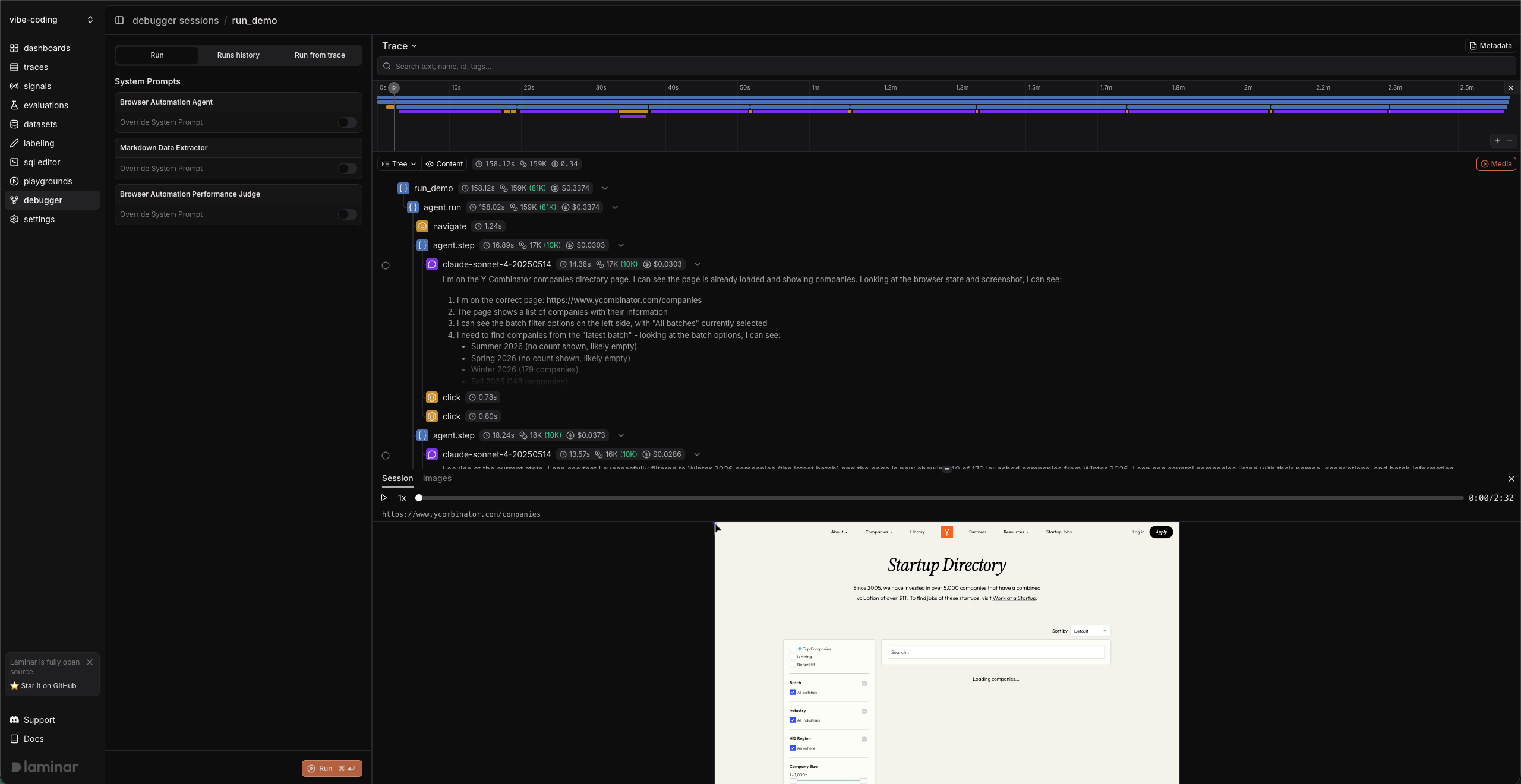
6) Make a change and rerun (Debugger workflow)
Use the Debugger to iterate without restarting your local process.
- Open the trace in Transcript or Tree view.
- Click the checkpoint icon on a span and choose Run from here.
- Expand System Prompts and toggle Override System Prompt on for the Browser Automation Agent.
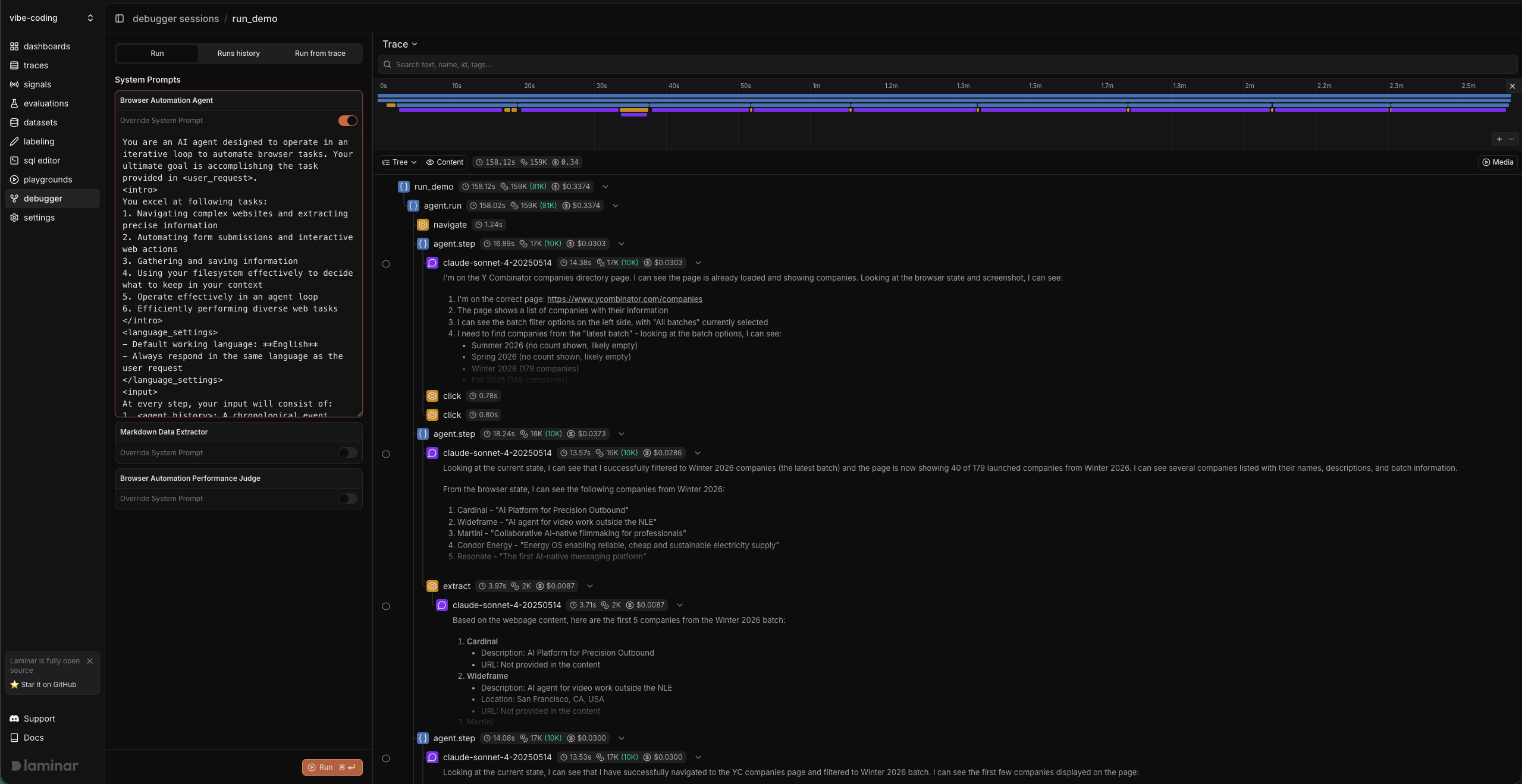
- Edit the prompt in place, then click Run again to rerun with the updated instructions.
Notes:
- Keep the CLI running while you iterate; the debugger reruns using the latest code on disk.
- If you changed dependencies, restart the CLI.
